The attendance bedrock you and your faculty can build on.

From a single department to your entire university, Acadly scales without losing the trust of the people in the classroom. Whether you need participation grading integrity, professional standards your faculty can enforce without friction, or records you can stake a decision on - Acadly simply delivers.
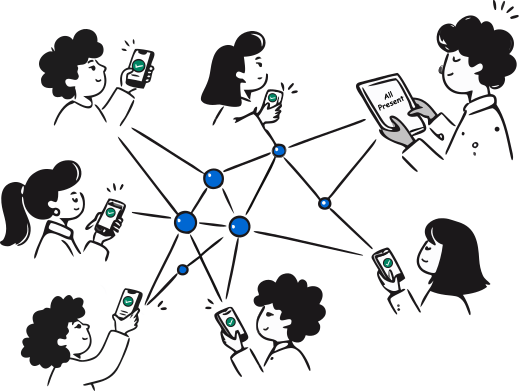

Image showing students’ devices connected with each other, forming a mesh network. The students see a confirmation of their presence on their device.
Used at 400+ US universities
PRINCETON UNIVERSITYTEXAS STATE UNIVERSITYCALPOLY POMONATHE UNIVERSITY OF ARIZONAUNIVERSITY OF OREGONTHE UNIVERSITY OF ALABAMALSUTEXAS TECH UNIVERSITYSAM HOUSTON STATE UNIVERSITYUNIVERSITY OF ARKANSASWISCONSIN

One semester. Two very different outcomes.

Most problems don't show up in the demo. They show up in week one. Here's how the semester plays out, with and without Acadly.
A contentious start

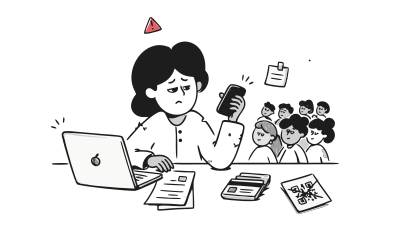
More steps than expected. More errors than anticipated. Students push back on location tracking. Admins carry the training burden. And still, people get left behind in the first week.
Illustration showing an instructor in front of a laptop, frustrated with their clunky attendance tracking system

Running from day one

Acadly's team handles bulk course setup before the first class. No privacy pushback, no queues, no pins on maps. Attendance runs from the first session.

Automation kicks in, sort of

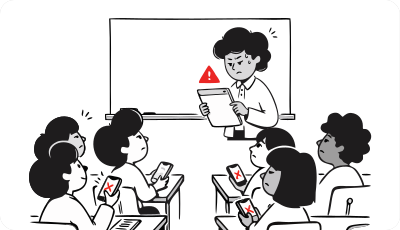
The initial friction settles and attendance starts running more reliably. Most institutions consider this a success. Quietly, the records are already being gamed.
Line-art illustration of a teacher standing at a whiteboard holding up a document with a red warning triangle icon, while seated students look up with surprised expressions; two students' phones are marked with red "no" symbols.

Already a month ahead

Acadly reaches reliable automation in month one. By month two, instructors have stopped thinking about attendance entirely. It just works.

Attendance fraud gets loud

Instructors start noticing patterns that don't add up. Ugly conversations happen. Trust in the data erodes. Faculty who were skeptical from the start feel vindicated. Churn begins.
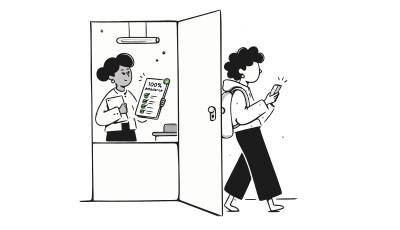
Line-art illustration of a student wearing a backpack and looking at their phone while walking through an open door, past a teacher inside holding a checklist marked "100%" with green checkmarks.

Discrepancies caught. Trust intact.

Acadly flagged irregularities in the first lecture. Students adjusted early. By month four, the system is a well-established, purring engine of predictable and trustworthy results.

A difficult decision

Admins are reviewing a purchase that didn’t deliver. Faculty skepticism about this tool starts to color attitudes toward future technology decisions.
Line-art illustration of a stressed woman resting her head on her hand at a desk, with a laptop showing a "Cancelled" stamp on screen and a wastebasket of discarded papers beside her.

Campus-wide confidence

Attendance is no longer a conversation. It runs. Faculty and administrators trust the data. The groundwork is laid for every future edtech initiative to be received with confidence.

Born in the classroom. Built for the institution.

Acadly solves the three things that determine whether an attendance investment pays off: faculty adoption, institutional intelligence, and seamless integration with your existing systems.

Faculty who actually stick with it

Most attendance tools get adopted in month one and abandoned by month four. Acadly was built to prevent that. Some instructors never touch it. Others use it to run polls, quizzes, and discussions alongside attendance. Acadly accommodates both, and everyone in between.

Intelligence, not just data

Full-day absences, continuous absenteeism, course threshold alerts, last date of attendance. Configured to your thresholds, delivered automatically. The layer that turns a tracking tool into a retention tool.

Works with your LMS

Full LTI compliance with Canvas, Blackboard, Brightspace, and Moodle. Roster sync, gradebook sync, SSO - all handled during onboarding.

 LMS integration built for institutional scale

Roster sync, gradebook sync, multi-section course import, and bulk institutional setup. All handled by Acadly, all connected to your LMS. No manual work required from instructors or administrators.

Roster and gradebook sync

Student add/drops sync automatically from your LMS, completely eliminating the need for manual roster management. The moment a session ends, attendance data pushes directly into the gradebook, requiring zero extra clicks from instructors after class.

Easy course import

Instructors can import their courses directly from the LMS in a few clicks. For courses with multiple sections, Acadly sets each section up as an independent course with its own roster and lecture schedule, keeping attendance records clean.

Admin dashboard

Attendance data rolls up to a central admin view, giving leadership visibility across all courses and instructors without having to chase down individual records. A single place to see what the data looks like at the institutional level, without any data consolidation overhead.

Bulk course setup

For institution-wide deployments, Acadly handles course setup in bulk, importing schedules, rosters, and attendance rules across every course simultaneously. Instructors walk into their first class with everything already configured, without needing to learn new software.

The white-glove treatment your faculty deserves

From day 0 to campus-wide scale, Acadly's team handles the heavy lifting so your instructors walk in ready to teach, not to troubleshoot.

Launch

Done-for-you setup

Every course configured before the first class. Rosters, schedules, attendance rules, and LMS integration, all handled by Acadly's team. Instructors walk in and start teaching. No setup required on their end.

Cruise

Dedicated support site

A custom support site built specifically for your institution. Training materials, video guides, and documentation tailored to your workflows and your LMS. Available to every instructor and student from day one.

Care

1-on-1 onboarding

Every instructor gets personalised onboarding if they want it. Direct, individualised attention to make sure each faculty member is confident before their first class.

See everything. Act early. Never chase a report.

Whether you need absence alerts, threshold reports, last date of attendance data, or engagement analytics, Acadly has it. Configured to your institution's needs and delivered automatically, without anyone having to ask.

Full-day absence alerts

Triggered when a student misses every class across all their courses in a single day. A signal that something may be wrong, delivered before it becomes a pattern.

Last day of attendance reports

Accurate, audit-ready records of the last date each student attended a course. Essential for Title IV compliance and R2T4 calculations, generated automatically with no manual data collection required.

Course threshold alerts

Set your own attendance thresholds for each course. Acadly alerts you the moment a student is at risk of falling below them, before the deadline to intervene has passed.

Continuous absence alerts

When a student misses multiple consecutive days across their courses, Acadly flags it. Early identification of the students most at risk of disengaging entirely.

Engagement analytics

Presence isn't participation. Acadly identifies students who are physically in the room but not engaging with in-class activities, giving you a fuller picture of engagement.

USED. TRUSTED. LOVED

From the people who made the switch

 30 minutes back every lecture. Attendance records that are trustworthy. Faculty who don't push back. Here's what universities say.

We adopted a GPS-based attendance system two years ago to bring some rigor to how we tracked class participation. But we started noticing that the data didn't add up. When we checked, roughly 10% of the attendance records weren't genuine. We switched to Acadly’s mesh-based tracking and it continues to make a difference. It's held up even in our largest lecture halls.

Dr. Thomas Nechyba

Associate Chair of Economics, Duke University

Acadly really extends the timeframe of learning... Instead of learning in terms of contact hours, it is now about reading the stuff beforehand, having discussions before class, doing things inside the class and after the class as well.

Jaap Vos

University of Idaho

I needed a painless, free way to monitor attendance... and an efficient way for my students to quickly submit in-class work. I could not believe what I found in Acadly... how easy it was to set up my huge roster and get going!

Natalie Mountjoy

Western Kentucky University

The automatic attendance feature on Acadly works as advertised! For my class of 113 students, it saves us over 30 minutes of administrative time per lecture.

Ron Bolen

Associate Chair of Economics, Duke University

I think using Acadly discussions for students to respond in-class gave them confidence that their ideas or thoughts had merit. Using polls was also really useful to gauge the students opinions on a topic.

Christine Julien

University of Texas Austin

I am structuring courses better, thanks to Acadly. I like that it works on my phone and laptop. I like its TeX interface for math and the ability to add images. Tracking attendance, sharing quizzes don’t take as much time as they used to

Dr. Preeti Aghalayam

IIT Madras

LIMITED SEATS
Apply for a pilot before you commit to a full rollout.

Run a structured, limited pilot with your own faculty and courses, fully supported by Acadly's team. Instructor onboarding, training webinars, LMS integration .

Apply for pilot program
Book a demo

Built for the IT standards higher education requires

Acadly is designed from the ground up to meet the compliance, accessibility, and data security requirements of higher education institutions.

DATA PRIVACY

Your student data deserves more than a checkbox.

Acadly collects next to no personally identifiable information, and never captures GPS data. Under an enterprise agreement, Acadly acts as a school official under FERPA — bound by the same obligations as your own staff. GDPR compliant too.

Read the privacy manifesto
SECURITY

Student data is a target. Acadly keeps it protected.

Acadly is built on secure, enterprise-grade infrastructure designed to protect student data at every layer. HECVAT documentation is available for institutional review.

Request HECVAT
ACCESSIBILITY

Accessibility is built in, not bolted on

Inaccessible tools create friction for students who rely on assistive technology and liability for the institution. Acadly is built to work for every student, on every device, without exceptions.

Download VPAT

FAQs

If something's still on your mind, it's probably here. If not, we're one conversation away.

How long does it take to get Acadly running across our institution?
Most institutions are up and running within two to four weeks, depending on IT review timelines. Acadly's onboarding team handles bulk course setup, LMS integration, and instructor onboarding. You don't need to coordinate this internally. We do it for you.
Does Acadly require IT involvement to deploy?
Minimal. Standard LMS plugins for Canvas, Blackboard, Brightspace, and Moodle are configured by Acadly's team during onboarding. Your LMS administrator will need to approve the integration, but the technical work is handled on our end.
We tried an attendance system before and abandoned it. Why would this be different?
Most systems fail because they create new problems: fake check-ins, faculty friction, or data that can't be trusted. Acadly is the only system where the instructor can do nothing and attendance still runs reliably and verifiably. The fraud detection runs in the background. The records sync automatically. There is nothing for faculty to remember, and nothing for students to game.
How does Acadly handle courses with multiple instructors or rotating faculty?
Acadly handles this cleanly. Courses can be configured with multiple instructors or rotated across faculty without any change to the student experience or the attendance record. This is particularly common in medical education programs where multiple faculty rotate through a single course.
 Who sees the attendance data, and at what level of detail?
Instructors see their own course data. Administrators see a rollup across all courses and instructors at their institution. Students see their own attendance record only. No student can see another student's data.
What happens to our data if we stop using Acadly?
Your institution's data is exportable at any time in standard formats. Acadly does not retain student data beyond the terms of your enterprise agreement.
Acadly automates class attendance and produces records that can't be gamed. It helps instructors capture presence and boost class participation. No hardware, no GPS, no faculty pushback. Trusted at 400+ US universities.
support@acadly.com

© 2026-27 ACADLY, INC. ALL RIGHTS RESERVED.

×

Apply for pilot

Every semester, we work closely with a few institutions on low-cost pilots to help them make the business case for Acadly internally. Share your details below and we'll be in touch.