The attendance system without a trade-off

Tracking attendance is one of the highest-leverage things an institution can do for upholding standards, professionalism, and bettering student outcomes. But most systems make you choose between reliability and automation. Acadly is the first that doesn't.
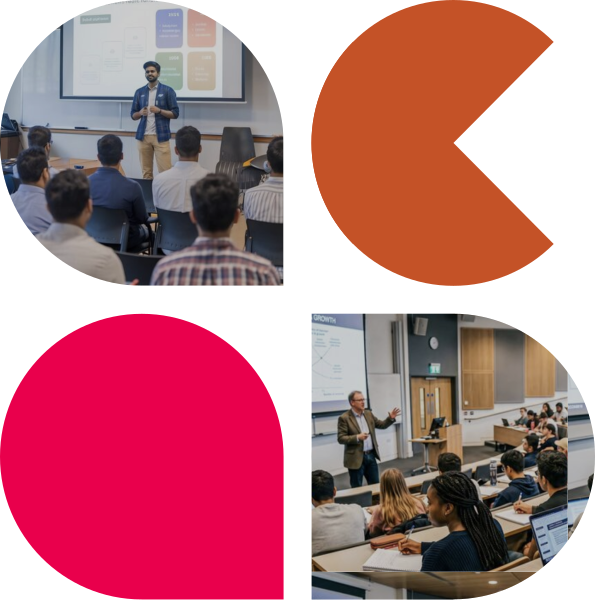

Image collage showing a couple of college classroom scenes with the instructor and students during a lecture
Used at 400+ US universities
PRINCETON UNIVERSITYTEXAS STATE UNIVERSITYCALPOLY POMONATHE UNIVERSITY OF ARIZONAUNIVERSITY OF OREGONTHE UNIVERSITY OF ALABAMALSUTEXAS TECH UNIVERSITYSAM HOUSTON STATE UNIVERSITYUNIVERSITY OF ARKANSASWISCONSIN

The vulnerabilities no attendance system likes to discuss

From remote check-ins to shared devices, traditional attendance methods make it easy for students to be marked present without ever entering the classroom.

1

GPS location can be faked

GPS-based systems take a phone's or laptop’s word for where it is. But these devices, it turns out, can be persuaded to say almost anything. It is trivial to broadcast a “spoofed” location and check-in from anywhere a dorm room, another city, anywhere at all.

QR codes travel fast

Rotating QR codes refresh every few seconds to prevent screenshots being shared. But they cannot beat a FaceTime or video call with someone outside. Codes are scanned in real time.

2
3

Cards get passed around

Clickers and RFID cards authenticate the device, not the person holding it. The cards and clickers get passed along.

The low-tech workarounds

Standing just outside the classroom door or the parking lot to catch a GPS signal. Impersonation on a sign-in sheet. Texting a check-in code to someone else. Signing into an app as someone else.

4
MESH NETWORK

 Trustworthy records. Instructors who stick with it.

  Acadly verifies physical presence without GPS, without codes, and without any action from the instructor. Every session runs automatically, every record reflects what actually happened in the room, and every irregularity gets flagged before the class is over.

Outside classroom alerts

Students need to be physically inside the room. Hallway and parking lot check-ins get flagged automatically.

Shared device alerts

When a check-in doesn't match expected patterns, Acadly notices and flags it for the instructor to review.
No GPS to spoof

No QR codes to share

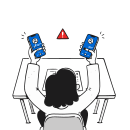
Two phones, one person

When two devices appear in the same spot, the instructor is alerted. No accusation just a flag to review.

No GPS to spoof

Acadly doesn't use location data. There's nothing to fake.

No QR codes to share

No codes, no screens, no window to exploit. Nothing to point a camera at.

A decade of firsts in attendance technology

The mesh network that really works. The only PowerPoint add-in built for attendance. The first system to flag fraud in real time, during class. And the first to verify without surveillance that students on Zoom were actually there.

Mesh-network attendance (2018)

Acadly pioneered the use of mesh networking for classroom attendance verification. No GPS, no QR codes, no hardware to purchase or maintain. The network works silently and automatically, impervious to the workarounds that make other approaches unreliable.

Zoom attendance (2020)

When COVID moved classes online, Acadly built a way for instructors to gauge active attention levels. The instructor launches checks whenever they want. Students get a prompt on screen: are you here? No surveillance, just a simple software roll call.

PowerPoint attendance (2024)

Acadly is the only attendance system with a native Microsoft PowerPoint add-in. One click from the slide starts attendance without leaving the presentation and switching context. Works on Mac and PC, and syncs to the gradebook when the session ends.

Real-time fraud detection (2026)

Acadly is the only classroom attendance system that detects suspicious patterns during class and alerts the instructor about possibly fraudulent check-ins before the session ends. Not after. Not in a report the next day. During class, while there is still time to act.

THE BIGGER PICTURE

 Where is your institution on the attendance automation hype cycle?

Most institutions buying attendance technology today are somewhere between the peak and the trough. The ones getting real value have moved past both.

Technology trigger Peak of inflated expectations Most institutions are here Or heading here Trough of disillusionment Slope of enlightenment Acadly takes you here Plateau of productivity
Peak - Avoid this trap

QR & GPS automation

QR codes, GPS apps, clickers, and RFID promise full automation. Institutions buy fast. Results look promising early on.

Trough - Avoid this trap

Distrust causes faculty churn

Faculty stop trusting the data. Institutions quietly abandon their purchase or revert to manual tracking.

Slope

Grassroots demand

Instructors who care about attendance keep tracking it, with or without technology. The grassroots demand never went away.

Plateau - Where Acadly takes you

Automation with reliability

Real value delivered consistently. Attendance runs itself. Data is trustworthy. Faculty don't push back. This is where Acadly takes you.

Technology trigger Peak of inflated expectations Most institutions are here Or heading here Trough of disillusionment Slope of enlightenment Acadly takes you here Plateau of productivity
COVID forces universities to care about attendance. New solutions emerge and early excitement builds.
QR codes, GPS apps, clickers, and RFID promise full automation. Institutions buy fast. Results look promising early on.
Faculty stop trusting the data. Institutions quietly abandon their purchase or revert to manual tracking.
Instructors who care about attendance keep tracking it, with or without technology. The grassroots demand never went away.
Real value delivered consistently. Attendance runs itself. Data is trustworthy. Faculty don't push back. This is where Acadly takes you.

Five pillars. Most systems cover two or three.

Every institution deserves an attendance system that delivers on all five. Most settle for fewer.

Features

Acadly logo

GPS

GPS icon

QR Codes

QR code icon

Clickers

Clicker icon

Biometric

Fingerprint icon
Record integrity

Acadly makes it significantly harder to game in the first place, and for anything that slips through, suspicious patterns are flagged to the instructor during class, before the session ends.

Automation
Limited
Limited
Limited

Zero actions from the instructor. One tap from the student. Configure once and every subsequent session runs automatically. GPS and QR require active check-ins every class.

Privacy

Acadly does not track or store anyone's GPS location during or after class. Presence is verified through device signals within the classroom.

Zero hardware

Runs entirely on devices your students and instructors already carry. No RFID cards, no clickers, no scanners. Scale from one classroom to fifty overnight.

PowerPoint integration

The only attendance system with a native Microsoft PowerPoint add-in. Instructors launch attendance directly from their slides without leaving the presentation. Works on Mac and PC.

Features
GPS
QR Codes
Clickers
Biometric
Record integrity
Automation
Privacy
Zero hardware
PowerPoint integration
Limited
Limited
Limited
Limited
Limited
USED. TRUSTED. LOVED

From the people who made the switch

 30 minutes back every lecture. Attendance records that are trustworthy. Faculty who don't push back. Here's what universities say.

We adopted a GPS-based attendance system two years ago to bring some rigor to how we tracked class participation. But we started noticing that the data didn't add up. When we checked, roughly 10% of the attendance records weren't genuine. We switched to Acadly’s mesh-based tracking and it continues to make a difference. It's held up even in our largest lecture halls.

Dr. Thomas Nechyba

Associate Chair of Economics, Duke University

Acadly really extends the timeframe of learning... Instead of learning in terms of contact hours, it is now about reading the stuff beforehand, having discussions before class, doing things inside the class and after the class as well.

Jaap Vos

University of Idaho

I needed a painless, free way to monitor attendance... and an efficient way for my students to quickly submit in-class work. I could not believe what I found in Acadly... how easy it was to set up my huge roster and get going!

Natalie Mountjoy

Western Kentucky University

The automatic attendance feature on Acadly works as advertised! For my class of 113 students, it saves us over 30 minutes of administrative time per lecture.

Ron Bolen

Associate Chair of Economics, Duke University

I think using Acadly discussions for students to respond in-class gave them confidence that their ideas or thoughts had merit. Using polls was also really useful to gauge the students opinions on a topic.

Christine Julien

University of Texas Austin

I am structuring courses better, thanks to Acadly. I like that it works on my phone and laptop. I like its TeX interface for math and the ability to add images. Tracking attendance, sharing quizzes don’t take as much time as they used to

Dr. Preeti Aghalayam

IIT Madras

NO BUSY WORK

Integrations that work for instructors and leadership

Acadly fits into your technology stack - and life - like it was always there. Learn how we make integrations work for you rather than the other way around.

See how Acadly fits into your institution
Apply for a pilot before you commit to a full rollout.

Run a structured, limited pilot with your own faculty and courses, fully supported by Acadly's team. Instructor onboarding, training webinars, LMS integration .

Apply for pilot program
Book a Demo

FAQs

If something's still on your mind, it's probably here. If not, we're one conversation away.

How does Acadly detect fraud without tracking anyone's location?
Acadly's mesh-network technology verifies who's physically in the room by reading signals between nearby devices, not GPS coordinates. It can tell that a check-in came from outside the classroom or from a device that shouldn't be there, without ever knowing where that device actually is.
When Acadly flags something suspicious, does it accuse the student?
No. A flag is just that — a flag. The instructor sees it, reviews it, and decides how to handle it. Nothing is auto-reported, and no student is called out in front of the class.
Does this hold up in large lecture halls, or only small classes?
It's built for scale. The mesh network doesn't rely on line-of-sight scanning or one-at-a-time check-ins, so it performs the same whether you're teaching 20 students or 300.
How is this different from GPS, QR codes, or clickers?
Each of those has a known workaround — spoofed GPS, screenshotted QR codes, passed-around clickers. Acadly doesn't use any of them, so there's nothing to spoof, share, or pass along. It's also the only technology with zero hardware and native PowerPoint integration.
Can I run attendance during a Zoom or hybrid class?
Yes. Acadly can prompt students on-screen during a Zoom session to confirm active presence — no surveillance, just a simple software check-in — alongside the same polls and quizzes you'd run in person.
Do I have to leave my slides to start attendance?
No. Acadly's PowerPoint add-in starts attendance with one click from the toolbar. It also works from the web or mobile app if you don't teach from PowerPoint.
What if a student doesn't have a smartphone?
This is a rare case but students can ask the instructor to register their presence manually instead.
Acadly automates class attendance and produces records that can't be gamed. It helps instructors capture presence and boost class participation. No hardware, no GPS, no faculty pushback. Trusted at 400+ US universities.
support@acadly.com

© 2026-27 ACADLY, INC. ALL RIGHTS RESERVED.

×

Apply for pilot

Every semester, we work closely with a few institutions on low-cost pilots to help them make the business case for Acadly internally. Share your details below and we'll be in touch.